Every product team I talk to is asking some version of the same question right now: how do we add AI to this?
For some, the answer is a chat box in the corner of the app. For others, it's a full rebuild. "SaaS is dead." "Everything should be agent-native." "Make it headless, put it behind a CLI or an API, and let the agents drive."
I understand the pull. Agents are getting genuinely capable, and nobody wants to be the team that missed the shift. But I think a lot of products are being rebuilt around the wrong question. The question isn't "how do we become AI-native?" It's "how do we build something that works for the people using it and the agents acting on their behalf?"
In this post I want to unpack what that looks like in practice, and then look at a pattern I think is a better way to add AI to a product than bolting on one more chat box.
The agent-only trap
You can see the pattern everywhere. Tools that people already depend on are getting "rebuilt for agents." New products show up with an agent-first interface, a prompt box where the dashboard used to be, and a promise that you'll never have to click a button again.
The problem is that many of these rebuilds are not as robust as the tools they're trying to replace. The original, human-native products have years of work baked in: permissions, security reviews, undo, bulk edits, audit trails, keyboard shortcuts, the odd export format one big customer needed. The agent-first version often has none of that, because the team assumed the agent would figure it out.
I recently talked about this with Cassidy Williams, Senior Director of Developer Advocacy at GitHub, on Talks with Ido Evergreen. When I asked where she sees software development in five years, her prediction was blunt. She expects a lot of companies to shut down after spending more on AI than they can sustain. And she pointed at exactly this pattern: tools declaring that SaaS is dead and everything should be headless, then rebuilding the same SaaS products, only "less secure and less feature-rich" than the human-native tools that already existed.
Her bet for who comes out ahead is the tools that embrace being agent-native and human-native. Established products that catch up on agent support get to keep years of security and rigor. Flashy, vibe-coded, agent-only products are the ones she expects to fall over, because they weren't built with the same care.
That matches what I see. When the agent is the only way in, every gap in the agent becomes a gap in the product. If the model misreads an instruction, there is no form to fall back on. If the model provider has an outage, your users can't do anything at all. If a user simply prefers to do the thing themselves, there's nowhere for them to go.
That is a fragile foundation. It ties your product's usefulness to one way of interacting with it, at a time when that way of interacting is still changing fast.
Build the capability once, give it two doors
The way out isn't to avoid AI. It's to be clear about where the real product lives.
Your product is the set of things it can actually do: create a project, trim a clip, schedule a post, refund an order. Each of those actions has rules. Who can do it, what it changes, what happens if it fails, whether it can be undone. That layer is the product.
A human-facing UI is one door into that layer. An AI agent is another door. Both should go through the same actions, with the same permissions and the same validation.
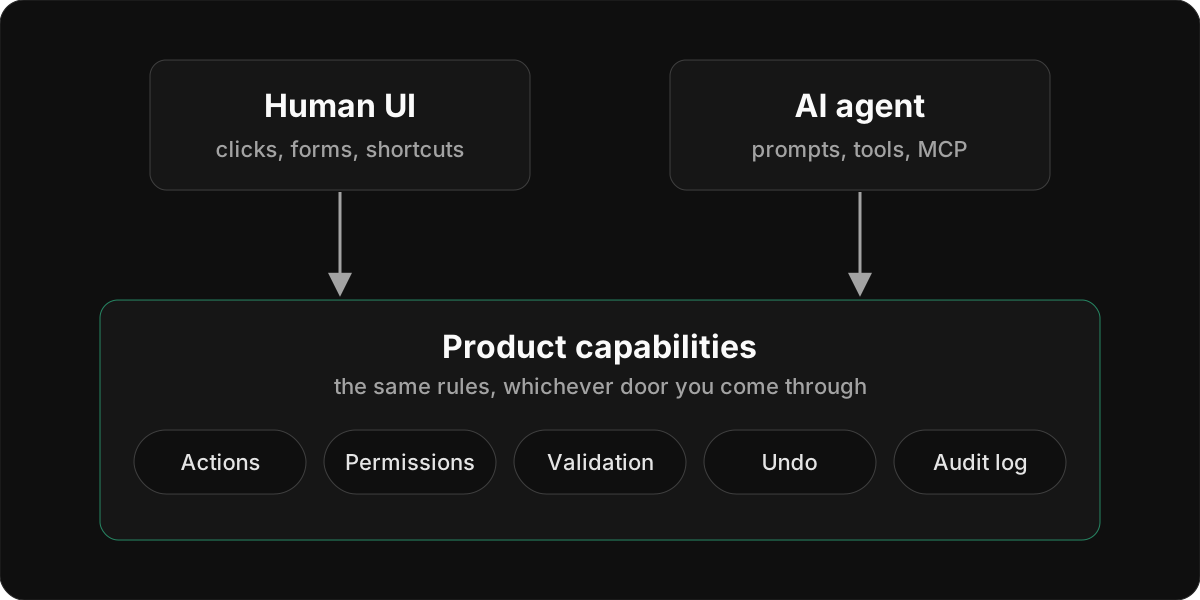
When you build it this way, a few good things happen:
- Every agent action is something a human could also do. If the agent trims a clip, the user can open that clip and see the trim in the normal editor. Nothing the agent does is hidden in a place humans can't reach.
- Humans can take over at any point. If the agent gets halfway and gets something wrong, the user finishes the job in the UI instead of starting over with a new prompt.
- The product survives changes in AI. If you swap models, or the way agents connect to apps changes, you change the agent door. The house is still standing.
Cassidy made a related point about the web itself. There's now more bot traffic online than human traffic, and if you want agents to use your site, you have to build it so anyone can use it: a person with a screen reader, and a bot tabbing through to figure out what to click. Good accessibility serves both. As she put it, it's a little sad that accessibility is becoming a first-class concern because of AI rather than because of people. Either way, the lesson is the same: the work that makes a product solid for humans is the work that makes it usable for agents.
A simple test I like: if you removed every AI feature tomorrow, would your product still be usable? If the answer is no, you've built a product for agents, not for people.
From one chat box to a team of agents
Once the foundation is right, the next question is how to put AI on top of it. The default answer for most teams is one chat box. You add a sidebar, connect it to an LLM, give it some tools, and call it your assistant.
That works for a while. But I've been watching Riverside, the recording and editing platform, and the way their AI features have evolved shows where this can go next.
Step one: a single assistant
Riverside first shipped Co-Creator, an AI agent that lives inside the editor. You chat with it and it does the work: tighten cuts, generate clips, add captions and music, prepare social-ready assets. One assistant, many jobs.
What I like about Co-Creator is where it sits. It didn't replace the editor. You can still cut on the timeline or edit the transcript like a document, and Co-Creator is another way to do the same edits. That's the "two doors" idea from earlier, already in a shipping product.
Step two: a team of specialists
In October 2026, Riverside announced Riverside Agents, which they describe as an AI production team built for video.
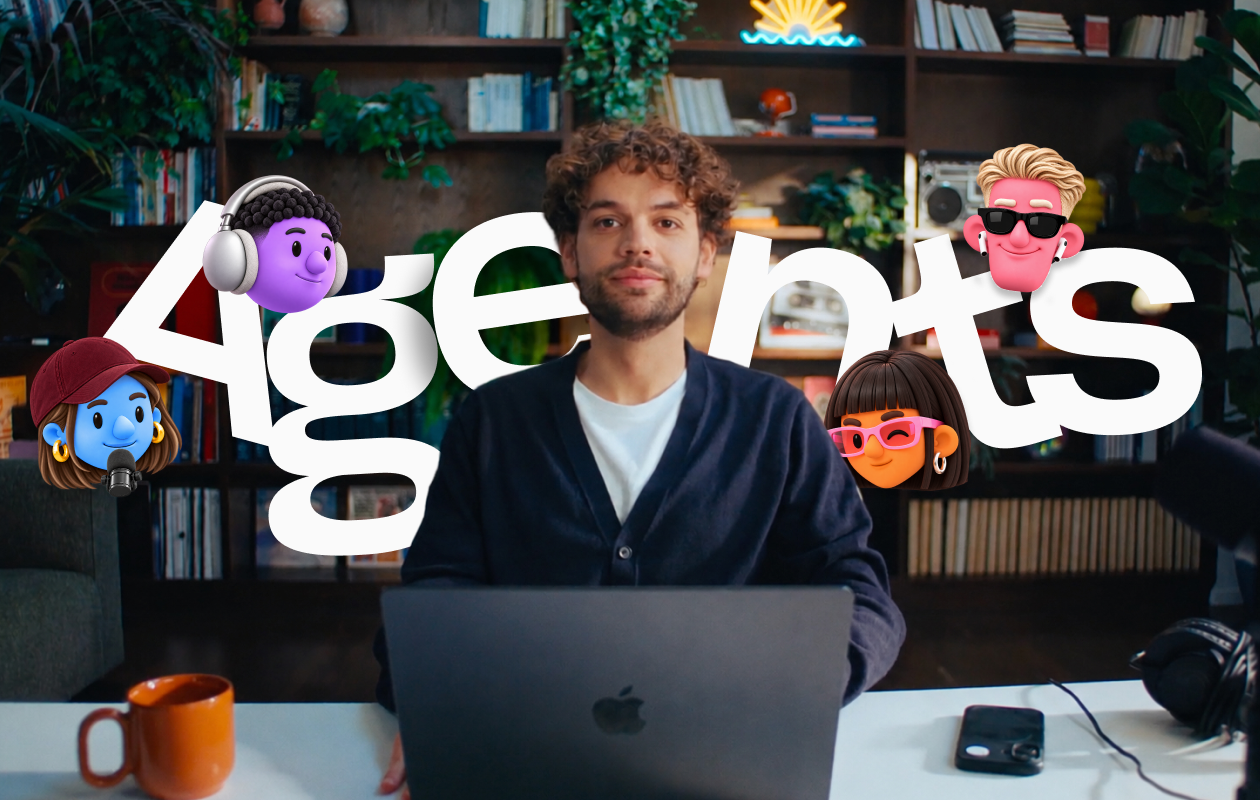
Image: Riverside
Instead of one assistant doing everything, there are four agents, each made for one job:
- Producer: prepares your session and supports you while you record.
- Editor: builds an editing plan for the whole episode and works through it with you.
- Clipper: finds the moments worth sharing and prepares them for social.
- Marketer: writes captions and show notes, then publishes or schedules your episodes and clips.
Their reasoning is the part worth studying. Creators already had AI help with individual tasks, but they were still the ones deciding what came next and carrying work from one step to the next. Having one smart tool for each step didn't remove that coordination job.
So the agents hand work to each other. After a recording, the Clipper flags moments and the Editor drafts the cut before you've even reviewed the footage. When a clip is ready, it moves to the Marketer with a suggestion for where to post it. Riverside's line for this is "You never manage the handoff."
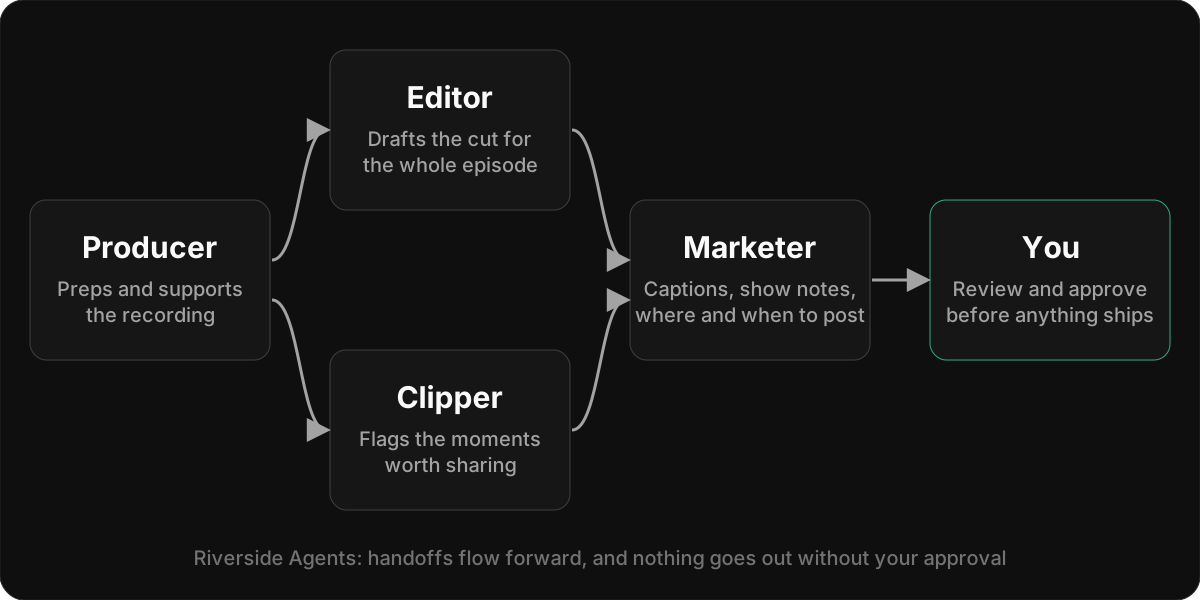
Two other details matter. Nothing gets published without your approval: the agents draft, and you make the calls. And the agents remember how you like things done, so they improve over time.
From the user's side, it feels like one production team. Behind it, specialists are passing work along, each one doing the part it's good at.
Where I'd take it next
Riverside's handoffs mostly flow forward, from recording to publishing. The same pattern also works backwards, starting from what you want to achieve. Imagine asking the Marketer to promote last week's episode. It needs clips, so it asks the Clipper. The Clipper finds a strong moment that needs a cleaner cut, so it asks the Editor. The finished clip goes back to the Marketer, who writes the post and queues it for your approval.
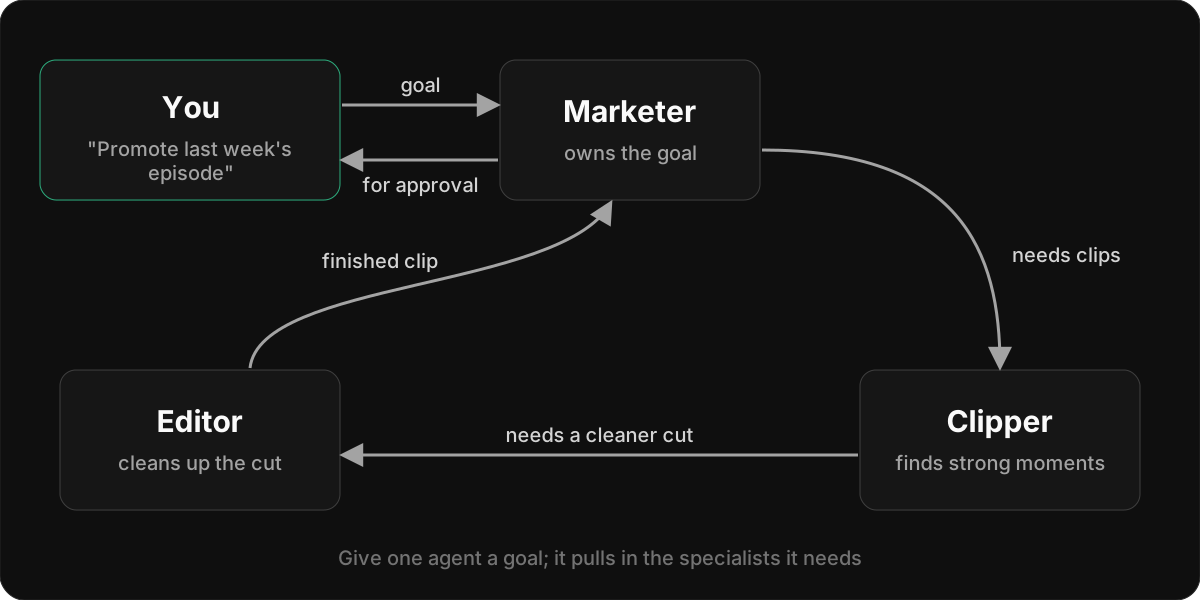
That's the shift worth noticing. You stop driving a single assistant step by step, and you start giving a goal to a team that knows how to split it up.
Why roles beat one giant assistant
You can build all of this with one assistant and a long list of tools. So why split it up?
Each agent gets a smaller job. An editor agent only needs to understand editing. Its instructions, tools, and context stay focused, which usually makes it more reliable than one assistant juggling forty tools.
Roles match how people already think about the work. Podcasters already understand the difference between a producer, an editor, and someone who handles marketing. Naming agents after those roles makes it obvious what each one is for and who to ask.
Handoffs become visible. When the marketer asks the clipper for segments, that's a step the user can see, check, and step into. With one opaque assistant, all of that reasoning happens in a single blob you can't inspect.
You can improve one role without breaking the others. If clipping quality is weak, you work on the clipper. The marketer doesn't change.
Where this connects back to humans
Here's the part that ties the two halves of this post together. A team of agents is only a good idea if it sits on top of the same capabilities humans use.
Riverside's approval step is a good example: the agents can do the work, but a person decides what goes out. If the clipper's output is a set of real clips in the user's project, the user can review them, delete the bad ones, or trim them by hand. If the editor's changes are normal edits on the timeline, the user can undo them. If the marketer's scheduled post shows up in the same calendar where the user schedules posts manually, nothing is hidden.
That's the difference between agents that work alongside people and agents that replace the product. In the first case, the agents are a faster way to use a product that already works. In the second, the agents are the product, and the product is only as good as today's model.
A checklist before you add AI to your app
If you're adding AI features to an existing product, or building a new one, here are the questions I'd ask:
- What are the core actions in my product? Write them down as plain verbs with rules attached. This is the layer both humans and agents will use.
- Can a human do everything the agent can do? If not, either add a UI for it or ask whether the agent should be doing it at all.
- Can a human see and undo what the agent did? Agent actions should land in the same places, with the same history, as human actions.
- What happens when the AI is unavailable or wrong? The product should still work. The user should be able to finish the task by hand.
- Is one assistant enough, or does the work have natural roles? If your users already think in roles (producer, editor, reviewer, marketer), agents with those roles that can delegate to each other may fit better than a single chat box.
- Are handoffs between agents visible? Users should be able to see who did what, check the in-between steps, and step in.
Closing thoughts
The products that come out of this period in good shape won't be the ones that went agent-only, or the ones that ignored AI. They'll be the ones that built solid products humans can rely on, then gave AI a proper way in.
Start with capabilities that work for people. Add agents on top of the same foundation. When one assistant isn't enough, let a team of specialists hand work to each other. And at every step, make sure a human can see what happened and take over.
That way, whatever AI looks like next year, your product still works for the people using it.
For more on this topic, watch my conversation with Cassidy Williams on Talks with Ido Evergreen, where we also get into GitHub Copilot, trusting agents, and open source in the agentic era.